RIVEL OS · studio mode

Your studio,
without a broken schedule.

Online booking, memberships, point of sale and WhatsApp with AI in one place. Your students book from a link, your instructors take attendance from their phone, and you see it all clearly, in English and Spanish, in your time zone.

This is RIVEL OS in studio mode. Studio booking software running on the same system and the same licence as everything else RIVEL does. There is no separate studio product and no separate price.

Start free for 14 days Get in touch

14-day trial. No card.

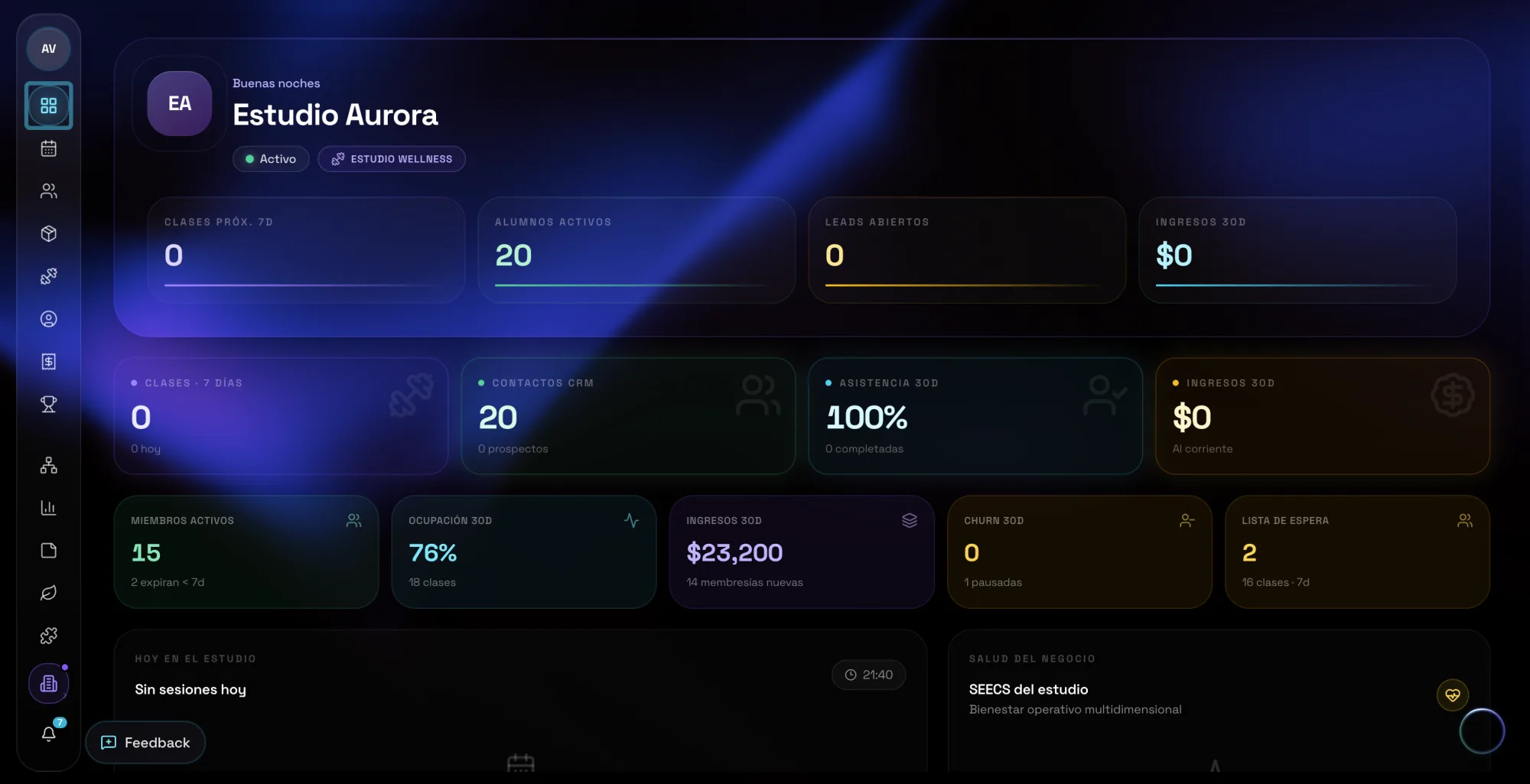
RIVEL OS in studio mode: the studio's weekly schedule, active students, revenue, occupancy and business health in one view.

The problem

The notebook works, right up until it doesn't.

A notebook, WhatsApp and a spreadsheet hold your studio together today. They are also the reason something breaks every week.

  • Overbooked classes.Capacity lives in three places at once, and none of them tells the truth.
  • Packages that expire with no warning.The student finds out at the front desk, and the awkward conversation lands on you.
  • The cash never adds up.Sales get jotted down wherever there's room, and by month end nobody knows what came in.

One system

Studio mode is not another product.

RIVEL OS is one adaptive operating system. Studio mode does not stack a second system on top of it. It changes what the system reads as your real state, and what it puts in front of you first.

In a studio, real state is three things.

  • Occupancy.Which classes run this week, who teaches them, and how many spots are actually left.
  • Packages.Who has classes left, whose package expires this month, and who already renewed.
  • Attendance.Who showed up, who stopped coming, and which class is quietly emptying out.

RIVEL OS reads those three, then runs the same loop it runs for every business inside it.

  1. Direction
  2. State
  3. Decision
  4. Execution
  5. Evidence
  6. Learning
  7. New state

That is why occupancy, packages and attendance stop being three tools that disagree with each other.

All in one

Your whole studio, in one system.

Studio mode pulls together everything that's scattered today across the notebook, the chat and the spreadsheet.

Memberships and point of sale

Charge, sell and keep it all balanced.

List plans with automatic renewal and custom packages, with expiry dates and classes left always visible. At the front desk, quick sales with inventory: sell a package and the income logs itself. Your finances, in one place.

Schedule and team

A schedule that tells the truth.

Recurring classes in a series: edit once and it carries through to the sessions already scheduled. Real capacity, no overbooking. Configurable cancellation windows, plus the one-off exception when you choose to make one. Profiles and history for every student, with search that understands accents.

Get going

Up and running in an afternoon.

  1. 1

    Turn on studio mode

    Name, logo and time zone. RIVEL OS arrives already speaking studio. Two minutes.

  2. 2

    Load your schedule and your plans

    Your recurring classes, your packages and your prices, exactly the way you already run them.

  3. 3

    Share your booking link

    Send it over WhatsApp or drop it in your bio. Your students start booking on their own.

Pricing

One RIVEL licence. Studio mode included.

RIVEL

$20 USD / mo

Studio mode comes with your RIVEL licence. It is not a separate product and it has no separate price.

Need staff later? That is RIVEL Teams at $25 per person, billed to the studio. Students always join free by link.

  • Online booking and portals by link
  • Memberships, packages and automatic renewal
  • Point of sale with inventory
  • WhatsApp with AI
  • Schedule with real capacity, no overbooking
  • Student profiles and history
  • Studio finances in one place
  • In English and Spanish, your time zone
Start free for 14 days

14-day free trial. No card. Billed in USD via Stripe.

FAQ

Straight questions, straight answers.

Do my students need to create an account?

No. They book from your studio's public page and reach their portal through a direct link. No passwords, no apps.

Is studio software a separate plan?

No. Studio mode is included with your $20 RIVEL licence. Studio OS is a mode inside RIVEL OS, not a product you buy on top of it.

Do my instructors pay per seat?

Students are always free by link. When other people work inside the studio, that is RIVEL Teams at $25 per person, billed to the business. Solo is just your $20 RIVEL licence.

Do I lose my WhatsApp number?

No. The AI agent runs alongside the app on your phone: your number and your chats stay exactly the same, they just answer on their own now too.

What happens when the trial ends?

Your studio switches to read-only: nothing gets deleted. If you decide to continue, you pick up exactly where you left off.

What currency are you charged in?

In dollars (USD), via Stripe. $20 a month for RIVEL, studio mode included. RIVEL Teams is $25 per person only when you add staff.

Can I cancel whenever I want?

Yes. From your billing portal, anytime and with no phone calls.

Share your link.
Let the studio breathe.

Set up your studio today and run it on your real schedule. If something doesn't add up, message us and we'll sort it out together.